

Goldify Casino Mobile Play on Android and iPhone in the UK
Most people who search for a Goldify Casino app want to spin slots on the sofa or the train rather than at a desk, and a phone brings its own questions about screen orientation, mobile data, battery heat, autoplay and reading small print. This page works through those practical points for adult readers in Great Britain. It draws on screenshots of the live site taken in October 2026 and on the brand's own description of itself, and it keeps confirmed observations apart from claims that still need checking.
The short version is that no store listing was confirmed for Android or iPhone, so mobile access runs through the phone browser. The first decision is between a home screen shortcut and an unofficial installation file; after that come habits that keep sessions short and costs visible. Licensing hangs over all of it, since the brand names no regulator, and the wider assessment of the operator lives in our Goldify Casino UK review.
Does a Goldify Casino App Exist for UK Phones?
When this page was checked, neither Google Play nor the App Store held a confirmed listing for the brand, and the site itself displayed no store badges. The mobile footer of one language version carried only Visa and Mastercard logos, an 18+ badge, a BeGambleAware badge and the line "Version v2.2.9", a version number that on its own says nothing about a downloadable product. Some promotional pages talk about app access, but none of it could be traced to an official file, so a native Goldify Casino app should be treated as unverified.

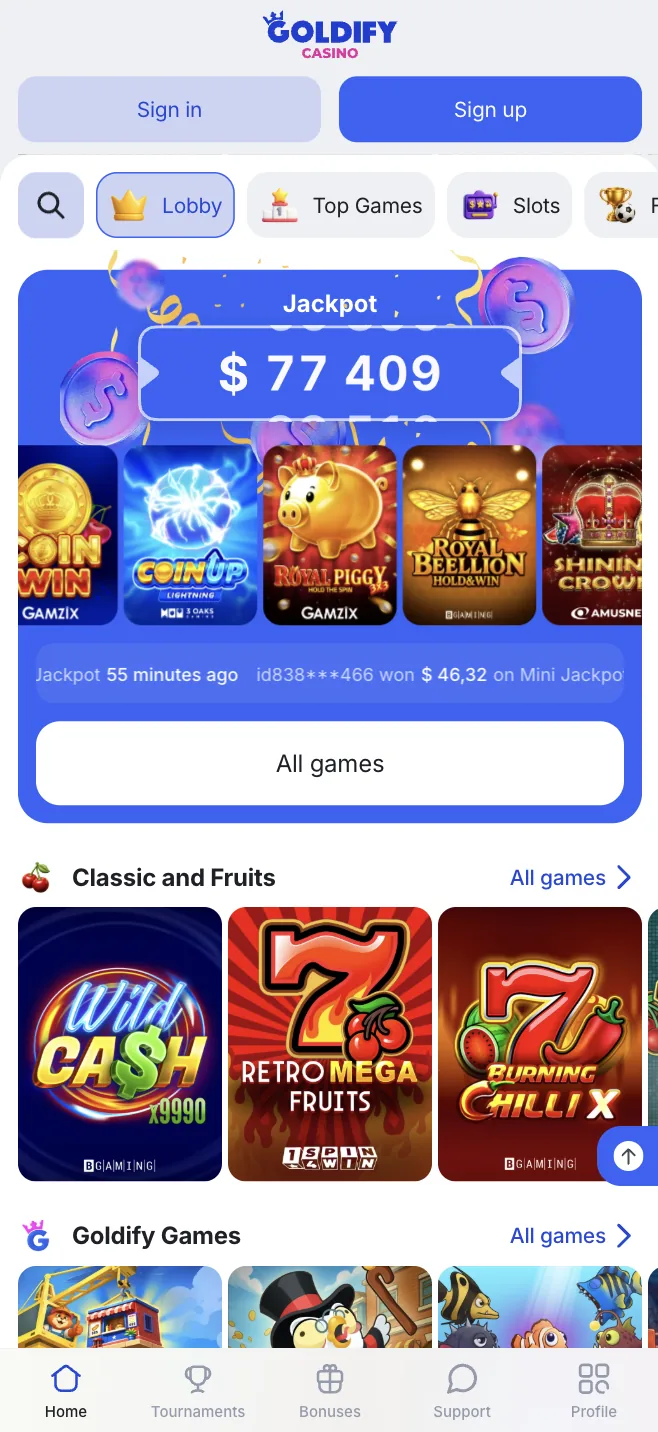
What does exist is a mobile version of the website. Opened in Chrome, Samsung Internet or Safari, it carries the same lobby as the desktop site, plus a strip of five buttons along the bottom (Home, Tournaments, Bonuses, Support and Profile), tabs for Slots, Fast and Live games, and shortcut tiles for Aviator, Ice Fishing, Megablock and Crazy Time. Pinned to the home screen, the Goldify Casino mobile site behaves much like an app and never needs a manual update, because each visit loads the current version.
Browser Shortcut Versus a Goldify Casino APK
Android owners face a choice that iPhone users do not: keep using the browser or go looking for an installable file. Search results for a Goldify Casino APK tend to lead to third-party pages rather than to anything the operator clearly hosts, and that matters more than any feature list. What follows sets the demands a sideloaded file makes on the phone against the much smaller footprint of a shortcut.
What a Goldify Casino APK Download Involves
Android apps are distributed as APK packages, and anything obtained outside Google Play has to be sideloaded: the browser or file manager is given permission to install unknown apps, which switches off one of the phone's main safety checks. Because no official file is confirmed, a Goldify Casino APK download found through a search engine or a messaging group has no reliable publisher, store review or developer page behind it.
A repackaged file can ask for access to text messages, contacts or accessibility services, which is exactly what malware needs to read one-time banking codes. Anyone who still decides to download Goldify Casino files from outside a store should read the permissions screen, refuse anything beyond basic network access and switch the unknown sources setting off again afterwards. Typical warning signs that a file is not what it claims include:
- a request to turn off Play Protect or other security warnings first;
- permissions for text messages, contacts, call logs or accessibility services;
- a download link shared through Telegram, WhatsApp or a social media comment;
- an icon or file name that does not match the branding on the website;
- a promise of an extra bonus available only inside the installed version.
Why the Home Screen Shortcut Is the Safer Route
A shortcut created in Chrome gives almost everything a sideloaded file would without asking for any permissions. The Add to Home screen option in the three-dot menu places an icon beside the other apps; nothing new is installed, and a long press removes it again. Anyone weighing up a Goldify Casino app download will find this the option with the fewest moving parts, and security updates remain the browser maker's job.
Sign-in still happens through the normal Goldify Casino login window, which in October 2026 asked for an email address and a password, offered a "Forgot password?" link and also allowed sign-in with Google. Storing the password in the phone's password manager rather than in a note means it will only autofill on the correct domain, a quiet but useful defence against lookalike mirror sites that copy the design of the real lobby.
Playing on an iPhone Through Safari
In the UK an iPhone does not install apps from loose files the way an Android phone can, so the sideloading problem described above does not arise. With no confirmed App Store listing, Safari is the realistic route for anyone with an iPhone or iPad, and the experience depends on a handful of iOS settings. Below are the steps for pinning the site to the home screen, followed by what the absence from the store tells a careful player.
Adding the Site to an iPhone Home Screen
On iOS a home screen icon is the closest thing to a Goldify Casino app download, and it takes only a few taps. Doing it once properly also breaks the habit of reaching the casino through search adverts or links in messages, which is how many people end up on copied sites. The routine works the same way on recent iPhones and iPads:
- open Safari and type the casino address by hand instead of following an advert;
- check the padlock and the exact spelling of the domain before signing in;
- tap the Share icon at the bottom of the screen;
- scroll through the share sheet to the Add to Home Screen entry;
- give the icon a clear name and tap Add.
Behind the icon the site runs in a separate window, yet it is still Safari underneath, so blocking all cookies can break the sign-in session and clearing website data logs the account out. If the brand later moves to a new mirror address, the old icon may stop working or redirect somewhere unfamiliar, which is the moment to check the domain again.
Why No Goldify Casino Apps Appear in the App Store
A store listing would bring a named developer, a privacy label and a review process run by Apple. None of that is available, because no App Store entry for Goldify Casino apps could be linked to the operator. Anyone who wants to download Goldify Casino onto an iPhone should regard a similarly named listing from an unknown developer as unrelated, and possibly as a fake built to harvest login details.
The gap fits a wider pattern. According to its about page, Goldify is "a legal online casino, holding leading positions" and welcomes players worldwide, but that page gives no licence number and no operating company, and it does not say which authority, if any, granted a licence. A browser icon works perfectly well for play, yet it adds none of the accountability that a store listing or a named licence holder would bring.
Portrait or Landscape for Slots on a Small Screen?
On a phone, orientation decides how much of the game is visible, how large the buttons are and how often a stray thumb triggers a spin. The lobby mixes five-reel titles such as Rich Wilde and the Book of Dead or Big Bass Splash with Megaways games, fast games like Aviator and live shows like Crazy Time, and each suits a different grip. Most modern slots adapt to either position, so the choice is about comfort and control.
When Portrait Mode Works Better
Holding the phone upright suits one-handed play and the fast games row, where Aviator, Jackpot Mines or Space XY rely on a bet field and a cash-out button rather than a wide grid. The balance, stake and main button sit close to the thumb, and the bottom bar stays in reach for a quick exit to the account. For short sessions with simple games, portrait keeps everything on one compact screen.
The drawbacks show up with richer slots. Reels shrink, paytable text becomes hard to read, and the spin button often lands where the thumb rests while scrolling. Turning on rotation lock in the Control Centre on iOS or in the quick settings on Android stops the game flipping sideways when the phone tilts, which cuts accidental taps and keeps the layout predictable.
Why Landscape Suits Wider Reels and Live Shows
Turning the phone sideways gives six-reel Megaways grids and live game shows the full width of the screen. On Crazy Time the wheel, the presenter and the betting spots are far easier to follow, and paytables usually lay out more readably. The stake and spin controls move towards the edges, which makes starting a round by accident less likely.
The trade-off is that landscape generally needs two hands and keeps more moving content on screen, which costs battery. It is also easier to lose track of time when the game fills the display and the status bar clock disappears. Browsing the lobby in portrait and rotating only for the game itself builds a small natural pause into each session.
Mobile Data, Battery and Heat
A typical slot downloads most of its graphics and sound when it loads, and each spin then exchanges only a small amount of information with the game server, so data use comes mainly from opening many games and scrolling animated thumbnails. Live game shows stream video continuously and can use far more data than a long slot session, so they are better kept for trusted Wi-Fi. On a patchy signal a spin may freeze; the outcome is generally settled on the server, so reopening the game or checking the bet history is safer than tapping again.
Animated reels and live video keep the screen bright and the graphics chip busy, and a phone under sustained load warms up, then often slows down and dims the display, which shows up as stuttering animations and delayed taps. Playing while charging on a bed or cushion adds more heat. Battery saver and Low Power Mode reduce background work, and a hot phone or a low battery warning is a sensible point to stop rather than plug in and carry on.
Autoplay Settings and Session Time on a Phone
Mobile play happens in short bursts that add up without being noticed, and the controls inside each game can slow that down or speed it up. Because Goldify names no UK licence, the online slot stake caps that bind UKGC licensees cannot be assumed here: since 9 April 2025 adults aged 25 and over have been limited to £5 a spin, and since 21 May 2025 those aged 18 to 24 to £2. That puts more weight on the player's own settings.
What Autoplay Changes on a Touchscreen
Autoplay, where a game offers it, runs a chosen number of spins without a tap between them. On a phone that removes the one physical action marking each decision, and combined with quick-spin modes it can push through many rounds while the screen is barely watched. Any loss limit inside the autoplay menu is set by the studio, so the options differ from title to title.
A practical approach is to leave autoplay and quick-spin off so that every round needs a deliberate tap. Where autoplay is used, a low spin count, a loss limit and a balance check after each run keep the pace visible. Noting the starting balance before a session also helps, because the figure in the corner is easy to overlook once the reels are moving.
Using Phone Tools to Cap Session Length
Screen Time on an iPhone can set a daily limit for a specific website as well as for Safari as a whole, and Digital Wellbeing on many Android phones can put a timer on the browser. A plain alarm set before opening the lobby is cruder but effective, especially on another device, so that switching it off means stepping away from the game.
Firmer barriers exist too. Blocking tools of the Gamban type can prevent gambling sites from opening on the handset, and most UK banks offer a setting in their app that refuses gambling payments. Such measures carry extra weight with this brand, because GamStop only reaches operators inside the UK licensing system, so a GamStop self-exclusion would not stop play here.
Goldify Casino Mobile Settings Compared
Without a native Goldify Casino app, most decisions that shape a mobile session are made in the phone's settings rather than in the casino lobby. The table below pulls together the device features and in-game options covered on this page, what each one does to the experience of playing slots or live games, and a sensible default for adults who want the costs and the clock to stay visible:
| Device setting or feature | Effect on play | Recommendation |
|---|---|---|
| Rotation lock | Stops the game flipping between portrait and landscape mid-round | Switch it on and rotate only by choice |
| Home screen shortcut | Opens the site like an app without installing anything | Use it instead of an unverified Goldify Casino APK |
| Unknown apps permission | Allows sideloaded files to install on Android | Keep it off for the browser and file manager |
| Mobile data and Wi-Fi | Live video uses far more data than slot spins | Play live shows on trusted Wi-Fi only |
| Battery saver or Low Power Mode | Reduces background work and can slow animations | Treat low battery as a cue to stop |
| In-game autoplay and quick spin | Removes the pause between decisions | Leave both off or set a strict loss limit |
| Screen Time or Digital Wellbeing | Caps time on the browser or a single site | Set a daily limit before the first session |
None of these settings changes the odds of any game, which are fixed by the studio and shown in each title's information panel. What they change is the speed of play, and therefore how much money and time pass through a session before the player notices. A phone with rotation lock, a time limit and autoplay off simply builds in more moments to stop and think.
Checking RTP and Terms on a Small Screen
Return to player, or RTP, describes the proportion of stakes a game is built to pay back over a very large number of rounds, and most slots land somewhere between 94 and 97 percent. Each game publishes its own figure in its information panel rather than in a central casino list, so on a phone it takes a few extra taps to find. The same patience is needed for bonus terms, which sit behind small links and hold the conditions that matter most.
Finding the Info Panel Inside Goldify Casino Games
Most slots hide their rules behind an "i" icon, a question mark or a three-line menu button, often in a corner that is easy to miss in portrait. The RTP usually appears near the end of the rules, after the paytable and feature descriptions. Rotating to landscape and using the browser's zoom makes the small print far easier to read than a shrunken portrait layout.
Only the percentage shown inside the game itself should be trusted. Some studios release the same slot in more than one RTP setting, so a figure printed on a comparison or review page may not match the version loaded in the lobby. Checking a few Goldify Casino games from the same studio in this way shows whether the versions on offer sit at the top or the bottom of the usual range.
Reading Bonus Terms Before a Mobile Deposit
On the bonus page the first deposit is matched at 100%, rising to 125% when that deposit is made within an hour of creating the account, with a 5 USD minimum, a 300 USD ceiling on the bonus and 250 free spins for a deposit above the 15 USD mark (the page words this both as "more than 15 USD" and "from 15 USD", so a deposit of exactly 15 USD is a grey area). Other screens disagree: a banner in the sign-up window advertised "up to $10 000", and closing that window brought up an exit pop-up offering "up to 300 €", a pressure tactic that is easy to tap through on a small screen.
The wagering requirement is x35 on slots, to be met within 48 hours. Take a 55 USD deposit made inside the first hour: the 125% rate produces a 68.75 USD bonus along with the 250 free spins, and x35 on the bonus alone comes to 2,406.25 USD of turnover. At 96% RTP the expected loss on that turnover is about 96.25 USD, which is 27.50 USD more than the bonus itself, before any value from the free spins. If x35 covered deposit plus bonus instead, 123.75 x 35 = 4,331.25 USD would have to be staked, with an expected loss of about 173.25 USD; at a stake of 1 USD per spin (our assumption, not a published figure) that means more than 4,300 spins in two days. The bonus page does not say which base applies, what the maximum bet during wagering is or what each free spin is worth.
Offshore Status and Help for UK Players
Under the Gambling Act 2005, any operator offering gambling to people in Great Britain must hold a licence from the Gambling Commission. Commission rules in force from 19 January 2026 cap bonus wagering for licensees at 10x, so an x35 multiplier could not appear in a UKGC-licensed offer; the likely readings are that Goldify holds no Commission licence or that this promotion is aimed at players outside GB. The Commission's register of licensees is public and free to search on its website, which makes it the obvious check before any deposit.
A shortcut and a Goldify Casino APK leave the offshore position exactly the same. There is no UKGC oversight, no UK alternative dispute resolution service to turn to when a cash-out is refused, no GamStop coverage, no UK stake limits and no player funds protection. The April 2020 ban on gambling with credit cards applies to UKGC licensees only, so nothing guarantees it here, and the card logos in the footer do not show which card types are accepted. In the sign-up form seen in October, the currency drop-down defaulted to SGD, and GBP support remains unconfirmed.
Only adults aged 18 or over may gamble. If phone sessions are stretching longer or costing more than intended, the National Gambling Helpline is free on 0808 8020 133 at any hour of any day, and GamCare offers support as well. BeGambleAware publishes guidance and a self-assessment quiz, the Gordon Moody charity's Gambling Therapy service gives free multilingual help online, and GamStop covers UK-licensed sites; on the phone itself, blocking software together with a gambling block set up through the bank adds a second line of defence.